Overview
Project Overview
Welcome to Web & Attacks 101.
This course, referred to as a "Core Section", is all about learning the foundations of web application security by attacking and defending a real, deliberately vulnerable web app, then finishing and shipping that same application as a production Web Threat Intelligence Dashboard.
The material follows the narrative from Enterprise 101, Networks & Attacks 101, and Cloud & Attacks 101. Your on‑prem VMs, attacker host, Wazuh stack, and the AWS threat‑intelligence pipeline you built in CA101 all provide context for the hybrid detection scenarios here. The guides explain the why behind each vulnerability and control, not only the click-path.
👉 Journey To Production: Web & Attacks 101 is split into two environments. First a local Docker lab (INSECURE-threat-intel-app) where you run the six web attacks and defenses. This runs entirely on your workstation and needs nothing from the other Core Sections. Second, the production path that finishes the CA101 threat‑intelligence dashboard and migrates it to a budget‑friendly host (Fly.io + Neon) with CI/CD and a custom domain.
Network Topologies
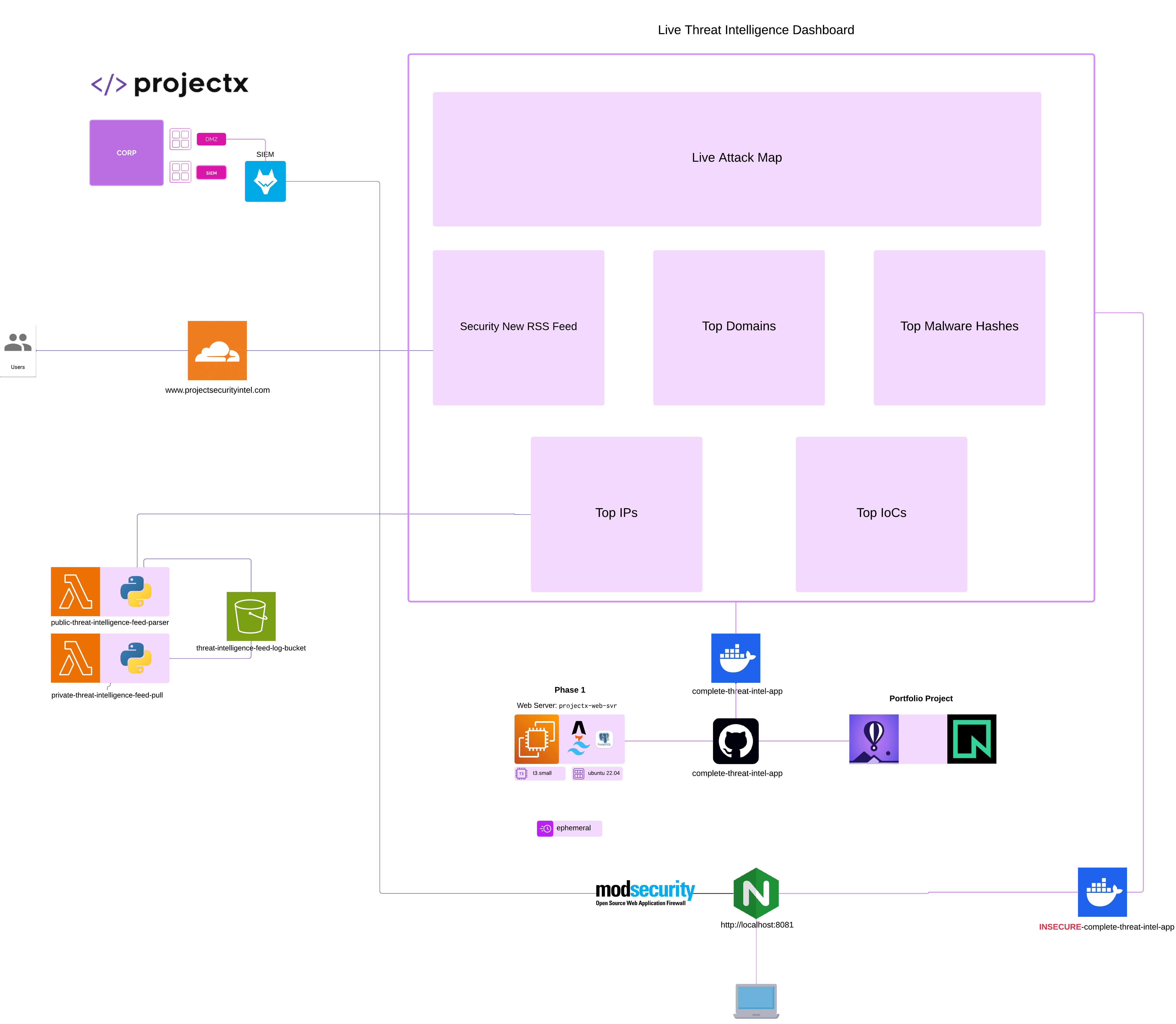
All topologies were made with Lucidchart.
There are two networks to keep separate in your head:
1. Local Docker lab (attacks + WAF): isolated on your workstation, browsed at http://localhost:8081.
Your browser :8081
       ↓
  [nginx]          reverse proxy (:80)  ← swapped for ModSecurity + OWASP CRS in the WAF guide
       ↓
  [app container]  Astro SSR + auth (:4321, internal)
       ↓
  [postgres]       synthetic panel data + lab vulnerability tables
2. Production / portfolio (dashboard): the finished app hosted publicly.
git push main → GitHub Actions → flyctl deploy → Fly.io (HTTPS) → Astro SSR
                                                        ↓
                                                 Neon Postgres (TLS, dashboard.panel_feed)

EventBridge → public-threat-intelligence-feed-parser → S3 (.json)
            → private-db-threat-intelligence-feed-pull → Neon (INSERT)
Local lab is local only
Do not expose port 8081 (or the vulnerable app) to the public internet. The INSECURE-threat-intel-app is intentionally broken and is meant to be reached only from your own machine.
Attacker
We will be performing "ad hoc" attacks, similar to NA101, CA101, and now WA101. Instead of an end-to-end attack, like we saw in Enterprise 101, each of our attack scenarios corresponds to an attack tactic (the why) and technique (the how). All six web attacks are driven from Burp Suite against the local lab.
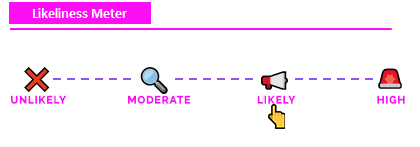
"Likeliness" Meter
Each attack is rated on the "Likeliness Meter" or how likely the attack is to happen in the real world.
- Unlikely: Most likely won't happen (never say never).
- Moderate: Has a chance of happening given certain context and dependencies (i.e. the attacker has to be on the same WiFi network).
- Likely: Could happen, especially if certain conditions are met (and security controls have not been met).
- High: Will likely happen given conditions (i.e. brute forcing passwords on an open SSH server).
👉 Why?: Security training often focuses on disparate attack tactics and techniques without disclosing whether the attack would actually be real-world. As we are interested in the security components of these labs, it's important to know how likely an attack is to actually happen.
Exercise Files
Exercise files are used throughout Web & Attacks 101. We use exercise files for:
1) The deliberately vulnerable INSECURE-threat-intel-app Docker stack (attacks + WAF lab).
2) The complete-threat-intel-app Astro dashboard, plus its Dockerfile, fly.toml, and .github/workflows/deploy-fly.yml for the portfolio deploy.
3) The threat intelligence Lambda functions and the GeoLite2 Lambda layer build script.
You are welcomed to download these project files; the full code is not embedded into the guides. They are linked to the respective GitHub repository and called out during each guide.
Clone the repository: git clone https://github.com/projectsecio/exercise-files/tree/main/web-attacks-101
Or
Book mark the above and download as you go, just make sure you use dark mode, it gives you a power.
Infrastructure
Unlike the earlier Core Sections there are no new virtual machines to build. WA101's infrastructure is a set of containers on your workstation for the attack/defense labs, plus cloud services for the portfolio deploy (most of which are free tiers or reuse what you already provisioned in CA101).
Local Docker Lab: INSECURE-threat-intel-app
Runs three containers via docker compose. Browse it at http://localhost:8081.
| Container | Image / build | Port | Function |
|---|---|---|---|
nginx |
nginx:1.27-alpine |
8081 → 80 | Reverse proxy in front of the app (swapped for the WAF in the ModSecurity guide) |
app |
Built from Dockerfile (Astro 5 SSR + @astrojs/node) |
4321 (internal) | Dashboard, login, six feed panels, and the deliberately vulnerable features |
postgres |
postgres:16-alpine |
internal | dashboard.panel_feed synthetic data + lab vulnerability tables |
Cloud / Production (Portfolio Deploy)
The portfolio path finishes the CA101 dashboard and moves it to a low-cost host. Most items reuse CA101 resources.
| Resource | Function | Core Section |
|---|---|---|
complete-threat-intel-app |
Finished Astro/Tailwind/Node SSR dashboard | WA101 |
Fly.io app (your-unique-threat-intel-dashboard) |
Container host for the dashboard (auto-stop, 512 MB) | WA101 |
Neon (neondb, dashboard.panel_feed) |
Serverless PostgreSQL over TLS | WA101 |
public-threat-intelligence-feed-parser |
Lambda: pulls feeds, writes S3 JSON | CA101 |
private-db-threat-intelligence-feed-pull |
Lambda: reads S3, inserts rows into Neon/Postgres | CA101 |
threat-intel-lambda-layer |
Lambda layer: geoip2 / maxminddb + GeoLite2-Country.mmdb |
WA101 |
EventBridge Scheduler (feed-*-daily) |
Daily 2:00 AM America/Chicago per panel |
WA101 |
S3 feed/log bucket + expire-feed-json-after-14-days |
Feed JSON storage + 14-day lifecycle | CA101 / WA101 |
projectx-prod-websvr-public (EC2) |
Legacy web-server host (optional, pre-Fly path) | CA101 |
| Cloudflare DNS (A / CNAME records) | Maps your domain to Fly (CNAME) or EC2 (A) | WA101 |
GitHub repo + deploy-fly.yml |
Source control + CI/CD to Fly on push to main |
WA101 |
Optional NA101 / CA101 Integration
Optional infrastructure if you want to connect the logging and detection content during the defenses section (the WAF → Wazuh scenario).
| Resource | Function | Core Section |
|---|---|---|
sec-box (Wazuh manager) |
SIEM that receives ModSecurity WAF alerts | NA101 |
| Wazuh agent (on the Docker host) | Reads modsec_audit.log and forwards to the manager |
NA101 |
Accounts & Credentials
WA101 uses a mix of lab logins (baked into the app) and third-party service accounts (mostly free tiers) for the portfolio deploy. Store any real tokens/passwords in a password manager — never commit them.
| Account / Credential | Value / Identifier | Where | Purpose |
|---|---|---|---|
| Lab dashboard login | analyst / projectx |
Local Docker app (localhost:8081) |
Sign in to the vulnerable app (AUTH_USERNAME / AUTH_PASSWORD) |
AUTH_SECRET |
see docker-compose.yml |
app container |
Session cookie signing |
cti-uploader-role |
simulated AWS keys (fake) | Simulated IMDS in the app | SSRF lab credential-theft target |
| GitHub account + PAT | scopes: repo, workflow |
GitHub | Push code and trigger Actions |
FLY_API_TOKEN |
fly tokens create deploy |
GitHub Actions secret | Let CI deploy to Fly.io |
| Neon database user | neondb_owner + password |
Neon | PostgreSQL owner for dashboard schema |
| Fly.io account | — | fly.io | Host the dashboard container |
| Cloudflare account | — | cloudflare.com | Register/manage domain + DNS |
| MaxMind account + license key | GeoLite2 (free EULA) | maxmind.com | Download GeoLite2-Country.mmdb for the layer |
| AWS account (from CA101) | projectx-prod-* identities |
AWS | Feed Lambdas, S3, EventBridge, Secrets Manager |
Do not commit secrets
Database credentials belong in fly secrets set (runtime). Never in Git. The FLY_API_TOKEN lives only as a GitHub Actions secret. Never commit .env, Neon passwords, or the MaxMind .mmdb.
Tools
Enterprise Tools + Defense
Docker / Docker Compose v2: Build and run the local INSECURE-threat-intel-app stack (npm run docker:up, docker compose -f docker/docker-compose.yml up --build).
nginx: Reverse proxy that fronts the app on port 8081 in the Docker lab.
ModSecurity v3 + OWASP Core Rule Set (CRS): The Web Application Firewall (owasp/modsecurity-crs:nginx-alpine) used to detect and block injection attacks without code changes; runs in DetectionOnly then Blocking mode.
Wazuh: SIEM (from NA101) that ingests the ModSecurity JSON audit log and raises WA101-tagged alerts mapped to MITRE ATT&CK.
Astro / Node.js 22: The dashboard framework and runtime (npm ci, npm run build, npm run dev).
psql: PostgreSQL client for creating schema/objects and verifying dashboard.panel_feed on Postgres or Neon.
aws (AWS CLI): Configure schedules/permissions, query Secrets Manager (get-secret-value), and manage the feed Lambdas, S3 lifecycle, and EventBridge.
flyctl: Deploy and manage the dashboard on Fly.io (fly deploy, fly secrets set, fly certs add).
Git + GitHub Actions: Source control and CI/CD (deploy-fly.yml) that build and deploy on every push to main.
Cloudflare: DNS and TLS in front of the dashboard (A record to EC2 or CNAME to Fly).
Offense
Burp Suite Community: The primary attack tool for all six web attacks — Proxy / HTTP history, Repeater, Intercept, Target site map, Decoder, and (limited) Intruder. Default listener on 127.0.0.1:8080 does not conflict with the lab app on 8081.
curl: Fire single attack payloads at the app (e.g. SQLi tautology, XSS script, command-injection metacharacters, SSRF metadata URL), especially when demonstrating the WAF.
Crafted SVG payloads: Hand-written SVG files with embedded <image href> references used to drive the image-processing SSRF against the simulated cloud metadata service.
Downloads, VMs, and tools
All downloads are already a part of the exercise files on Github. WA101 introduces no new ISOs or virtual machines, the labs run in Docker containers and cloud service free tiers.
Guides Numerical Order
The numerical order for the step-by-step guides is already in place based on the navigation menu. These guides serve as the basis for the project. It is recommended the respective guide docs page is opened while following along in the program.
👉 If you prefer to follow content by reading, these guides on this docs site will provide the same information as the video lectures.
Guides
Follow the sections in the this order:
- Finish Web Threat Intelligence Dashboard (AWS): Feed panels, EventBridge schedules, 14-day retention
- Portfolio Project — Finish Web Threat Intelligence Dashboard: Deploy (Fly.io + Neon), GitHub CI/CD, optional nav menu, domain registration
- Insecure — Build the local Docker container
- Attacks: SQL Injection, XSS, IDOR, CSRF, SSRF, Command Injection
- Defenses: SQLi sanitizing, XSS + CSP, IDOR authorization checks, CSRF tokens, SSRF outbound allowlist, shell execution, and the WAF (ModSecurity + CRS → Wazuh)
Guides Format
The screenshots always conform to step in text, then screenshot evidence below it.
We hope you enjoy this core section!
Made with ♥ by ProjectSecurity.io.