Dashboard panel threat intelligence feeds (WA101)
Prerequisites
- Cloud & Attacks 101 — Prepare Lambda Environment completed (S3 bucket,
projectx-lambda-feed-exec-role, and related IAM in place). - Public threat intelligence feed parser Lambda created and tested with
security_news_rssas in CA101 (see Public threat intelligence feed parser). - Optional but recommended for end-to-end dashboard data:
private-db-threat-intelligence-feed-pullingesting JSON intodashboard.panel_feed(Private DB threat intelligence feed pull).
Network topology
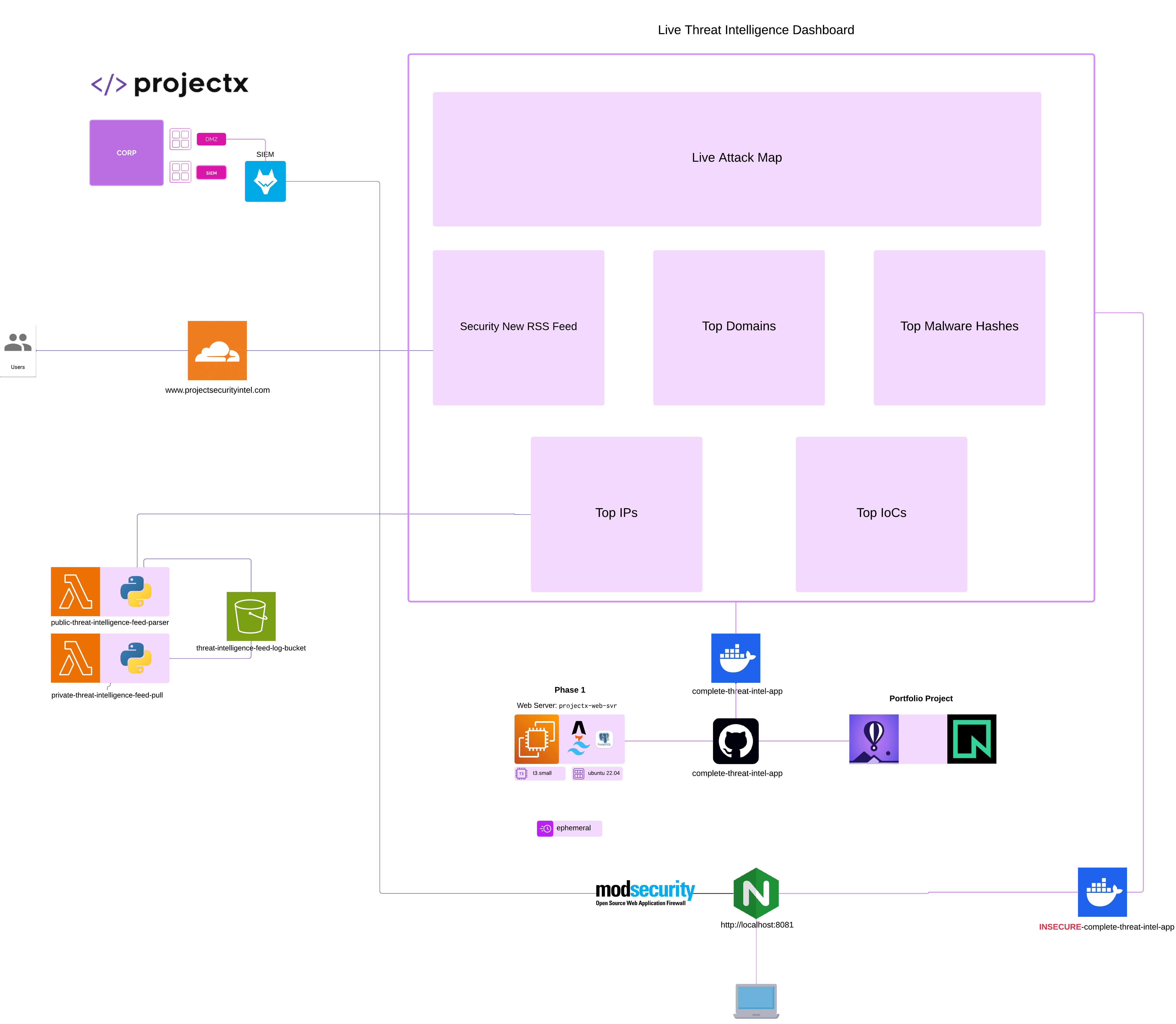
Where CA101 left off
In CA101, the public-threat-intelligence-feed-parser function is introduced with a single working feed: security_news_rss.
At that stage:
lambda_function.py(or equivalent handler in your exercise bundle) mapspanel_keyvalues to Python modules (rss_feed,top_100_domains_feed, …).- Only
rss_feed.pyis required for the first successful test; other panel keys are named in the handler and documentation but may still be stubs or missing from the deployment .zip you upload to Lambda. - A successful test with
"panel_key": "security_news_rss"writes a JSON snapshot to S3, typically under a date-partitioned key such asYYYY-MM-DD/security_news_rss.json(plus optionalS3_KEY_PREFIX). - PostgreSQL holds
dashboard.panel_feed, with rows keyed bypanel_nameso the Threat Intelligence Dashboard (Astro app) can read the latest payload per panel.
CA101 stopping point: you have proven RSS → Lambda → S3 (and optionally S3 → ingest Lambda → Postgres). The dashboard can show Security News once a row exists for security_news_rss.
What WA101 adds
WA101 completes the six dashboard panels by:
- Including all feed modules in the same Lambda deployment package (at the zip root, next to the handler).
- Providing GeoIP2 / GeoLite2 support for
top_10_countries_by_ipvia a Lambda layer (database file +geoip2/maxminddblibraries). - (Later in the portfolio path) scheduling each panel with Amazon EventBridge, retention (e.g. 14-day cleanup on S3 and Postgres), GitHub CI, and a custom domain.
This page focuses on (1) and (2).
Exercise code layout
Feed implementations and the handler live with the public parser exercise. In this repository they are under:
exercise-files/web-attacks-101/threat_intelligence_lambda_functions/public-threat-intelligence-feed-parser/
Upstream mirrors may use a cloud-attacks-101 path on GitHub; the file set is the same idea:
public-threat-intelligence-feed-parser (exercise-files)
Handler and panel map
The handler (e.g. lambda_function.py) defines PANEL_MODULES: each panel_key maps to a module name without .py:
panel_key (test event / EventBridge) |
Module file |
|---|---|
security_news_rss |
rss_feed.py |
top_100_domains |
top_100_domains_feed.py |
top_ips |
top_ips_feed.py |
top_10_countries_by_ip |
top_10_countries_by_ip_feed.py |
top_malware_hashes |
top_malware_hashes_feed.py |
top_iocs |
top_iocs_feed.py |
Each module implements the fetch/build logic and returns a payload structure (typically items plus metadata) that the handler wraps and writes to S3.
Step 1 — Add the five additional Python modules to the deployment package
CA101 often ships or builds a minimal public-lambda-deployment.zip (handler + rss_feed.py only). For WA101, rebuild the zip so all six feed modules are present at the root of the archive (same level as lambda_function.py):
rss_feed.py(already in CA101)top_100_domains_feed.pytop_ips_feed.pytop_10_countries_by_ip_feed.pytop_malware_hashes_feed.pytop_iocs_feed.py
Also include requirements.txt only if you bundle dependencies inside this function zip; many labs instead use a Lambda layer for shared libraries (see below).
Build rules (Lambda):
- No nested project folder at zip root—Lambda imports modules from the root.
- If you use
pip install -t .for function-local deps, install into the same directory you zip (watch size limits; prefer a layer forgeoip2/ large stacks).
Upload the new .zip under Lambda Code → Upload from → .zip file, then Save.
Step 2 — Top 10 Countries by IP: GeoLite2 and the Lambda layer
top_10_countries_by_ip_feed.py resolves IPs (from a public CSV source such as ThreatFox “recent” export) to countries using MaxMind GeoIP2 APIs. In Lambda it expects:
- Python packages
geoip2andmaxminddb(commonly supplied by a layer). - A GeoLite2-Country (or compatible)
.mmdbfile.
By default the feed looks for the database at:
/opt/GeoLite2-Country.mmdb
(Lambda mounts layers under /opt.) You can override the path with environment variable GEOLITE2_DB_PATH if you place the file elsewhere.
Option A — Use a pre-built layer .zip from WA101 exercise files
If your course materials include threat-intel-lambda-layer.zip (or equivalent) built for Python 3.12 / x86_64:
- In Lambda → Layers → Create layer, upload that .zip, choose compatible runtime Python 3.12.
- On
public-threat-intelligence-feed-parser→ Layers → Add a layer → select your custom layer.
Confirm the layer zip layout matches Lambda expectations:
GeoLite2-Country.mmdbat the root of the zip → appears as/opt/GeoLite2-Country.mmdb.python/lib/python3.12/site-packages/...for installed wheels → appears under/opt/python/....
Do not nest an extra opt/ folder inside the zip (that would become /opt/opt/... and break imports / paths).
Option B — Sign up for GeoLite2 and build the layer yourself
B.1 — MaxMind account and GeoLite2 download
- Go to MaxMind GeoLite2 sign-up and create a free GeoLite2 account (subject to MaxMind’s GeoLite2 End User License Agreement).
- In the MaxMind account portal, generate a license key (needed for automated downloads in some workflows; for a manual lab you can download the GeoLite2 Country tarball from the Download Files UI after logging in).
- Download
GeoLite2-Country.mmdb(binary database) and keep it on your workstation (e.g. next to your build script). Do not commit this file to a public Git repository.
B.2 — Layer contents: Python deps + .mmdb
The layer needs at least:
(Aligned with the parser’s requirements.txt for GeoIP; versions may be pinned in your layer requirements.txt.)
B.3 — Build with Docker (recommended)
This repository includes exercise-files/web-attacks-101/lambda-layer/docker-build-layer.sh, intended to run inside the AWS Lambda base image so wheels match Amazon Linux / Lambda:
Image: public.ecr.aws/lambda/python:3.12 (use bash as entrypoint for a build shell).
Mounts / inputs:
| Host path (example) | Container path | Purpose |
|---|---|---|
Layer requirements.txt |
/tmp/requirements.txt |
pip install -t ... for geoip2, maxminddb |
GeoLite2-Country.mmdb |
/tmp/GeoLite2-Country.mmdb |
Copied into zip root |
| Output directory | /out |
Script writes threat-intel-lambda-layer.zip |
Example (Linux / macOS, from directory containing the script and inputs):
docker run --rm \
  --entrypoint bash \
  -v "$PWD/docker-build-layer.sh:/tmp/build.sh:ro" \
  -v "$PWD/layer-requirements.txt:/tmp/requirements.txt:ro" \
  -v "$PWD/GeoLite2-Country.mmdb:/tmp/GeoLite2-Country.mmdb:ro" \
  -v "$PWD/out:/out" \
  public.ecr.aws/lambda/python:3.12 \
  -lc 'bash /tmp/build.sh'
Create layer-requirements.txt with the GeoIP dependencies (and only what belongs in the layer). The script installs to python/lib/python3.12/site-packages/ and adds GeoLite2-Country.mmdb at the zip root.
On Windows, use the same docker run from PowerShell or WSL; adjust host paths (%CD% or $PWD).
B.4 — Publish the layer and attach it
- Lambda → Layers → Create layer → upload
threat-intel-lambda-layer.zip. - Compatible architecture x86_64 (unless your function is arm64—then rebuild the layer for aarch64).
- Attach the layer to
public-threat-intelligence-feed-parser.
Step 3 — Environment variables (optional tuning)
Keep the CA101 variables (FEED_OUTPUT_BUCKET, S3_KEY_PREFIX, PANEL_KEY) as documented in Public threat intelligence feed parser.
For Top 10 Countries, optional overrides include:
| Variable | Purpose |
|---|---|
GEOLITE2_DB_PATH |
Override path to the .mmdb file (default /opt/GeoLite2-Country.mmdb). |
THREATFOX_RECENT_CSV_URL |
Override CSV URL (feed defaults to AbuseCH ThreatFox “recent” export). |
THREATFOX_HTTP_TIMEOUT_S |
HTTP timeout seconds (default 20). |
TOP_COUNTRIES_SOURCE_LIMIT |
Max CSV rows to scan before ranking (default 5000). |
Step 4 — Test events (per panel)
Use Lambda → Test with a JSON body that sets panel_key (and optional max_results):
RSS (regression check):
Top 10 Countries (requires layer + .mmdb):
Other panels:
Expect HTTP 200 and a new object under s3://YOUR_BUCKET/YYYY-MM-DD/<panel_key>.json. If top_10_countries_by_ip returns empty items, check CloudWatch Logs for:
- Missing
geoip2import (layer not attached or wrong Python version path). GeoLite2 DB not found(wrongGEOLITE2_DB_PATHor bad layer zip layout).
Step 5 — Align with the dashboard
The Threat Intelligence Dashboard reads dashboard.panel_feed by panel_name. Ingested names must match what the Astro app expects (e.g. top_100_domains, top_10_countries_by_ip, top_ips, top_malware_hashes, top_iocs, security_news_rss). Keep panel_key in the parser aligned with panel_name rows produced by private-db-threat-intelligence-feed-pull (or your ingestion path).
Next steps (portfolio roadmap)
- Amazon EventBridge — scheduled rules (or a single rule with different input JSON) to invoke
public-threat-intelligence-feed-parserdaily perpanel_key. - Retention — e.g. 14-day lifecycle on S3 prefixes and a matching cleanup strategy for
dashboard.panel_feed(scheduled job or partition policy), consistent with your compliance goals. - GitHub — source control, GitHub Actions
npm ci/npm run buildfor the dashboard, and optional deploy to EC2. - Custom domain — DNS and TLS in front of the web server (e.g. nginx + Let’s Encrypt, or ACM with a load balancer), after the app is stable behind a process manager.