Overview
Project Overview
Welcome to Cloud & Attacks 101.
This course, referred to as a "Core Section", is all about learning the foundations of cloud computing, while working on hands-on scenarios to learn about cloud attack techniques and defenses deployed to protect production enterprise networks.
The material follows the narrative from Enterprise 101 and Networks & Attacks 101 where your on‑prem VMs, attacker host, pfSense perimeter, and Wazuh stack provide context for hybrid detection scenarios. The guides explain the why behind each control, not only the click-path.
👉 Journey To Production: Cloud & Attacks 101 can be deployed and provisioned without the E101 or NA101, however, there will be a few scenarios in the defenses section that will not work, specifically the integration between our SIEM (Wazuh) and AWS.
Network Topologies
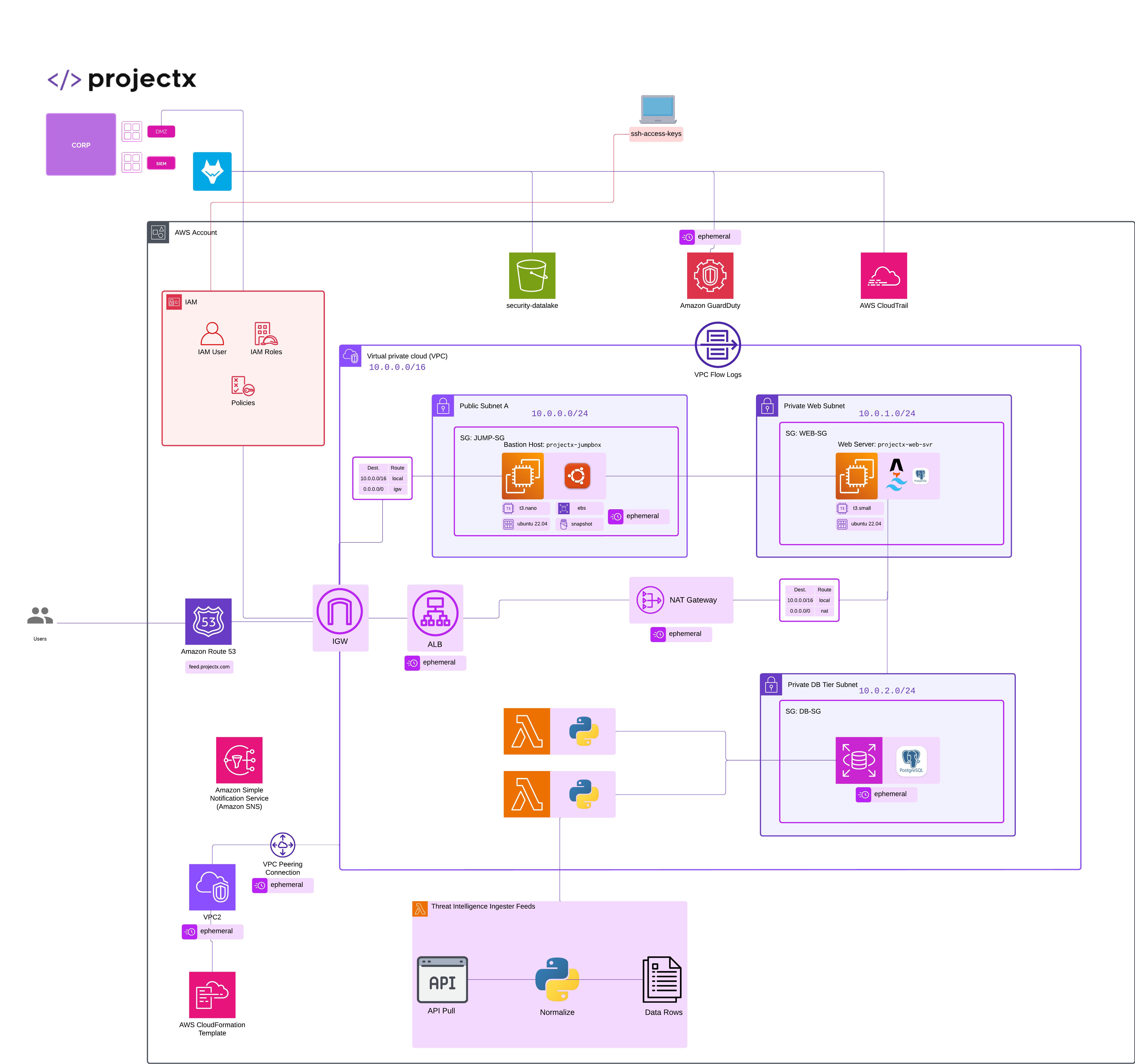
All topologies were made with Lucidchart
New Network
Attacker
We will be performing "ad hoc" attacks. Instead of an end-to-end attack, like we saw in Enterprise 101, each of our attack scenarios will correspond to attack tactic (the why) and technique (the how).
"Likeliness" Meter
Each attack is rated on the "Likeliness Meter" or how likely the attack is to happen in the real world.
- Unlikely: Most likely won't happen (never say never).
- Moderate: Has a chance of happening given certain context and dependencies (i.e. the attacker has to be on the same WiFi network).
- Likely: Could happen, especially if certain conditions are met (and security controls have not been met).
- High: Will likely happen given conditions (i.e. brute forcing passwords on an open SSH server).
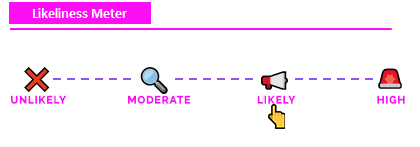
👉 Why?: Security training often focuses on disparate attack tactics and techniques without disclosing whether the attack would actually be real-world. As we are interested in the security components of these labs, it's important to know how likely an attack were to actually happen.
Exercise Files
Exercise files are used throughout Cloud & Attacks 101. We use exercise files for:
1) Deploying Ephemeral Infrastructure with CloudFormation Templates, including our deliberately vulnerable infrastructure in the attacks section.
2) JSON (Query DSL) Detection Files For Wazuh.
3) Threat Intelligence Baseline Files.
You are welcomed to download these project files, the full code is not embedded into the guides. They will be linked to the respective GitHub repository and called out during each guide.
Clone the repository: git clone https://github.com/projectsecio/exercise-files/tree/main/cloud-attacks-101
Or
Book mark the above and download as you go, just make sure you use dark mode, it gives you a power.
Hosts
This one is a bit overwhelming, do not worry, several of these resources are temporary for demonstration purposes as we familiarize ourselves with core cloud concepts in AWS or relate to
Basics
| Resource | Function | Function |
|---|---|---|
My-Desktop-Key-Pair |
SSH keypair for EC2 console login | Basics |
tmp-projectx-jumpbox |
Short-lived EC2 bastion for early steps | Basics |
tmp-projectx-jumpbox-sg |
Security group for temporary jumpbox | Basics |
IAM Basics
| Resource | Function | Function |
|---|---|---|
Administrators |
IAM admin group from earlier setup | IAM Basics |
projectx-prod-admin |
Dedicated IAM admin user | IAM Basics |
projectx-ec2-read-only |
Custom policy: EC2 describe read-only | IAM Basics |
projectx-employees-group |
IAM group for standard employee users | IAM Basics |
projectx-jumpbox-group |
IAM group for jumpbox-related users | IAM Basics |
projectx-prod-websvr |
IAM user for web server identity | IAM Basics |
projectx-prod-janed |
Sample employee IAM user (optional lab) | IAM Basics |
Networking
| Resource | Function | Function |
|---|---|---|
ProjectX-Prod-VPC |
Main lab VPC for ProjectX production | Networking |
ProjectX-Prod-IGW |
Internet gateway attached to VPC | Networking |
ProjectX-Prod-Public-Subnet |
Subnet with route to internet gateway | Networking |
ProjectX-Prod-Private-Web-Subnet |
Private subnet for application tier | Networking |
ProjectX-Prod-Private-DB-Subnet |
Private subnet for database tier | Networking |
projectX-prod-public-rt |
Route table for public subnet | Networking |
projectX-prod-private-rt |
Route table for private subnets | Networking |
projectx-prod-nat-GW |
NAT gateway for private outbound internet | Networking |
Compute
| Resource | Function | Function |
|---|---|---|
projectx-prod-jumpbox |
Bastion EC2 for operator access | Compute |
projectx-prod-jumpbox-sg |
Security group rules for jumpbox | Compute |
projectx-prod-websvr |
Primary web server EC2 instance | Compute |
projectx-prod-websvr-SG |
Security group for web server traffic | Compute |
Storage
| Resource | Function | Function |
|---|---|---|
projectx-prod-ebs-snapshot-1 |
EBS snapshot backup of web volume | Storage |
projectx-prod-websvr-ami |
AMI image built from web server | Storage |
Databases
| Resource | Function | Function |
|---|---|---|
projectx-prod-db-subnet-group |
Subnet group for RDS across AZs | Databases |
projectx-prod-rds-SG |
Security group for PostgreSQL RDS | Databases |
projectx-prod-rds |
RDS PostgreSQL instance identifier | Databases |
projectxdb |
Application database name | Databases |
projectx_dbadmin |
RDS master / admin database user | Databases |
webapp_rw |
Application read-write database user | Databases |
projectx-prod-websvr-public |
Web server EC2 running Postgres database | Databases |
projectx-prod/postgres/projectx-dbadmin |
Secrets Manager secret for DB admin | Databases |
projectx-prod/postgres/webapp-rw |
Secrets Manager secret for app DB user | Databases |
projectx-secrets-postgres-readonly |
IAM policy for reading DB secrets | Databases |
projectx-iam-websvr |
EC2 role reads database Secrets Manager | Databases |
Monitoring & Logging
| Resource | Function | Function |
|---|---|---|
projectx-prod-datalake-[username] |
S3 bucket collecting security log archives | Monitoring & Logging |
projectx-wazuh-s3-user |
IAM user for Wazuh reading S3 logs | Monitoring & Logging |
projectx-wazuh-s3-read-policy |
Policy granting datalake S3 read access | Monitoring & Logging |
projectx-prod-management-trail |
CloudTrail multi-region trail to S3 | Monitoring & Logging |
projectx-prod-vpc-flow-logs |
VPC Flow Logs delivery configuration | Monitoring & Logging |
transition-to-ia-after-30-days |
S3 lifecycle rule (IA transition) | Monitoring & Logging |
delete-vpc-flow-logs-after-14-days |
S3 lifecycle expiration for flow logs | Monitoring & Logging |
delete-cloudtrail-logs-after-14-days |
S3 lifecycle expiration for CloudTrail | Monitoring & Logging |
Serverless Threat Intelligence Pipeline Functions
| Resource | Function | Function |
|---|---|---|
threat-intel-lambda-layer |
Shared Python layer for Lambda functions | Serverless Threat Intelligence Pipeline Functions |
projectx-lambda-feed-exec-role |
IAM execution role for feed Lambdas | Serverless Threat Intelligence Pipeline Functions |
projectx-lambda-feed-s3-read-write |
Inline IAM policy for S3 read/write | Serverless Threat Intelligence Pipeline Functions |
projectx-lambda-feed-SG |
VPC security group for Lambda ENIs | Serverless Threat Intelligence Pipeline Functions |
projectx-s3-endpoint |
Gateway endpoint private access to S3 | Serverless Threat Intelligence Pipeline Functions |
threat-intelligence-feed-bucket |
Placeholder feed bucket from prepare lab | Serverless Threat Intelligence Pipeline Functions |
threat-intelligence-feed-parser-UNIQUE_STRING |
Example unique bucket name pattern | Serverless Threat Intelligence Pipeline Functions |
threat-intelligence-feed-log-bucket |
Example bucket storing feed JSON snapshots | Serverless Threat Intelligence Pipeline Functions |
public-threat-intelligence-feed-parser |
Lambda pulls feeds writes S3 JSON | Serverless Threat Intelligence Pipeline Functions |
private-db-threat-intelligence-feed-pull |
Lambda reads S3 inserts Postgres rows | Serverless Threat Intelligence Pipeline Functions |
threat-intel-feed-ingest |
Example S3 event notification name | Serverless Threat Intelligence Pipeline Functions |
Messaging
| Resource | Function | Function |
|---|---|---|
| (SNS topic — TBD) | SNS labels defined inside messaging guide | Messaging |
Attacks
| Resource | Function | Function |
|---|---|---|
delete-me-vuln-vpc |
Lab VPC with intentional exposure | Attacks |
delete-me-hardcoded-secrets |
CloudFormation stack for secrets scenario | Attacks |
delete-me-ssrf-ec2 |
Target EC2 for metadata SSRF lab | Attacks |
delete-me-api-gateway |
Insecure HTTP API for enumeration lab | Attacks |
projectx-leaky-bucket |
Example misconfigured public S3 bucket | Attacks |
Defenses
| Resource | Function | Function |
|---|---|---|
aws-config-compliance-alerts |
SNS topic for AWS Config findings | Defenses |
config-compliance-to-sns |
EventBridge rule forwarding to SNS | Defenses |
iam-policy-no-statements-with-admin-access |
Managed Config rule (IAM admin check) | Defenses |
iam-policy-no-statements-with-full-access |
Managed Config rule (broad IAM check) | Defenses |
projectx-app/production |
Example Secrets Manager secret path | Defenses |
projectx-app-secrets-reader |
IAM role for EC2 reading app secrets | Defenses |
ProjectXAppSecretsRead |
Example custom IAM policy name | Defenses |
NA101 Infrastructure
Optional NA101 VMs if you would like to connect the logging and detections content during the defenses section.
| Resource | Function | Function |
|---|---|---|
sec-box |
Dedicated Security Server | Defenses |
corp-fw |
Router & Firewall | Defenses |
Tools
Enterprise Tools + Defense
aws (AWS CLI): Configure accounts and profiles; query Secrets Manager (get-secret-value); start SSM Session Manager (ssm start-session); manage buckets, trails, and general AWS tasks. Attack scenarios also reuse it for unsigned S3 copy, stolen-credential profiles, and related misuse.
CloudFormation: Deploy and tear down stacks from the AWS Console—including deliberately vulnerable attack templates when indicated—and delete stacks to clean up.
ssh-keygen: Generate SSH key pairs for EC2 access (My-Desktop-Key-Pair flow).
psql: PostgreSQL client for admin checks, DDL/DML, connectivity tests, and application queries on RDS or EC2 Postgres.
Offense
s3scanner: Discover and probe publicly accessible S3 buckets from the attacker VM (-bucket, list modes); referenced in detection write-ups too.
bucket_finder: Bucket-discovery helper named alongside s3scanner in the misconfigured S3 bucket guide.
curl: Fetch EC2 user-data and instance metadata, probe headers (curl -I), invoke exposed API Gateway routes, pull remote config URLs, and hit local endpoints during exploitation labs.
wget: Download release archives (e.g. Gobuster tarball) onto the attacker or lab host.
jq: Filter and pretty-print JSON from API Gateway responses during insecure API abuse (curl piped to jq).
amass: Enumerate subdomains (amass enum -d …) to surface API Gateway–related hosts.
subfinder: Passive subdomain discovery (subfinder -d …) for the same reconnaissance step.
nmap: Port and service scanning (-p, -p-, -sV, -sC) against public IPs in open-VPC and related narratives.
masscan: High-speed port scanner cited as an alternative to nmap for discovery.
zmap: Internet-wide single-port scanner cited alongside nmap / masscan.
gobuster: Directory and file brute-force (gobuster dir …) to uncover hidden paths and sensitive files.
tar: Extract downloaded offensive-tool archives (e.g. unpack Gobuster after wget).
Downloads, VMs, and tools
All downloads are already a part of the exercise files on Github.
Guides Numerical Order
The numerical order for the step-by-step guides is already in place based on the navigation menu. These guides serve as the basis for the project. It is recommended the respective guide docs page is opened while following along in the program.
👉 If you prefer to follow content by reading, these guides on this docs site will provide the same information as the video lectures.
Guides
Guides Format
The screenshots always conform to step in text, then screenshot evidence below it.
We hope you enjoy this core section!
Made with ♥ by ProjectSecurity.io.