Data retention (14-day rolling policy)
Prerequisites
- Threat intelligence pipeline from CA101 in place: S3 bucket used by
public-threat-intelligence-feed-parser(JSON snapshots) andprivate-db-threat-intelligence-feed-pull, and PostgreSQL tabledashboard.panel_feedwithcollected_at(see Prepare Lambda Environment). - Permission to edit S3 lifecycle configuration on that bucket and to run SQL (and optionally cron or
pg_cron) as a privileged database role onprojectx-prod-websvr-public(or your lab web server).
Network topology
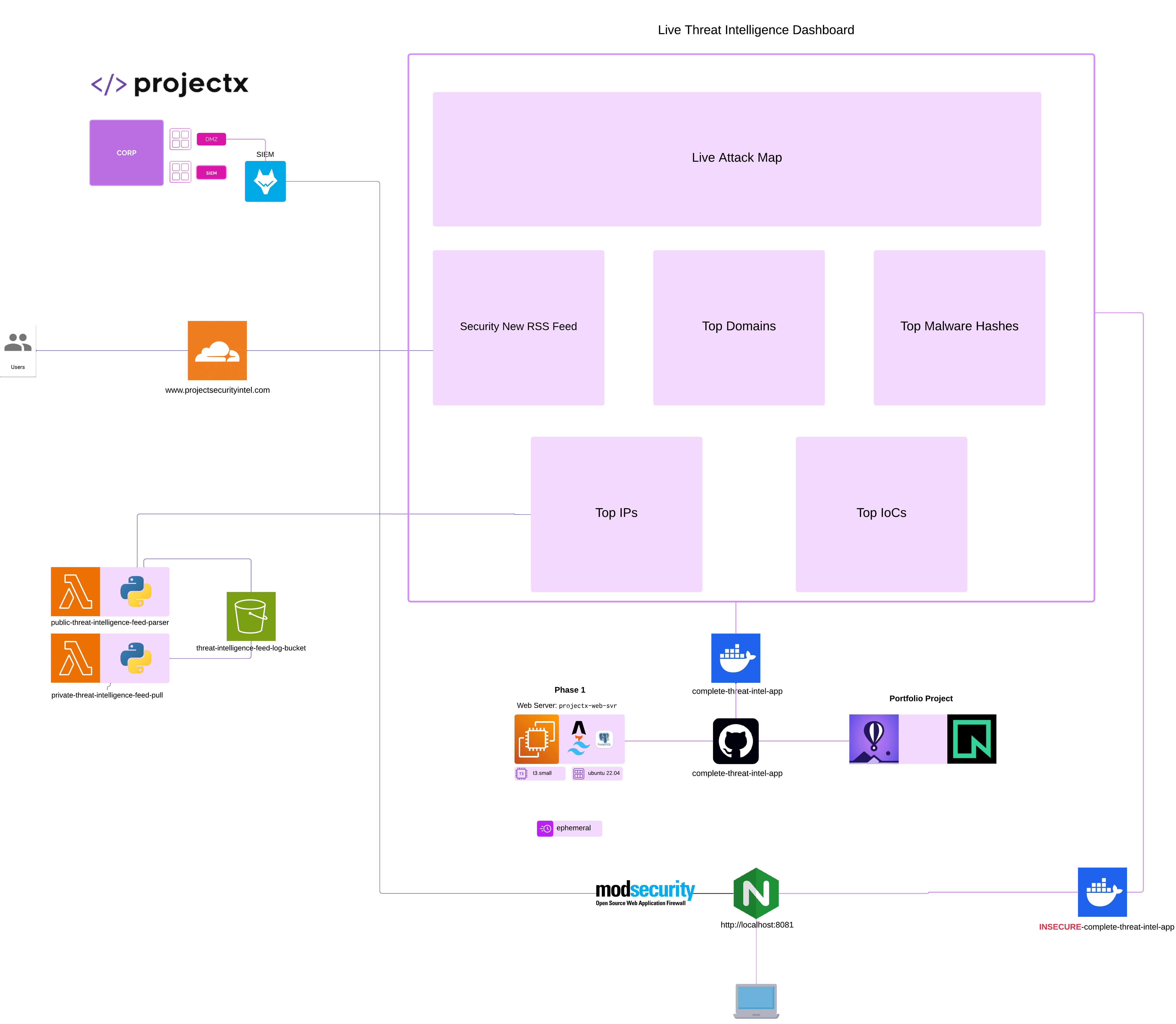
Overview
This guide adds a 14-day rolling retention policy in two places:
- Amazon S3 — automatically delete (or expire) old feed JSON objects in the threat intelligence log bucket so storage and listing stay bounded.
- PostgreSQL — delete old rows in
dashboard.panel_feedso the database does not grow without limit.
The dashboard reads the latest row per panel_name (ORDER BY collected_at DESC LIMIT 1), so removing rows older than 14 days does not affect the live UI as long as newer snapshots exist.
1. S3: 14-day lifecycle on the feed bucket
Your parser writes keys such as YYYY-MM-DD/<panel_key>.json (plus optional S3_KEY_PREFIX) into the bucket configured as FEED_OUTPUT_BUCKET (often named like threat-intelligence-feed-log-bucket-…).
Console steps
- Open Amazon S3 → select the feed / log bucket.
- Management tab → Lifecycle rules → Create lifecycle rule.
- Rule name: e.g.
expire-feed-json-after-14-days. - Rule scope: apply to all objects in the bucket, or limit with a prefix if you store other object types in the same bucket (for example only the prefix your Lambdas use).
- Lifecycle rule actions: enable Expire current versions of objects.
- Days after object creation: 14 (expire objects 14 days after they were written).
If S3 Versioning is enabled on the bucket, also configure Permanently delete noncurrent versions (and optional delete expired delete markers) with a window that matches your compliance story—otherwise old versions can remain.
- Save the rule. New expirations run on Amazon’s daily lifecycle batch (objects are not always removed the same second the clock hits day 14).
2. PostgreSQL: delete dashboard.panel_feed rows older than 14 days
Table shape from the lab (see Prepare Lambda Environment):
collected_at—timestamptz, set when the ingest Lambda inserts the row.
Schedule with cron and AWS Secrets Manager
Do not put PGPASSWORD='…' in crontab—it is world-readable to other users on many systems and ends up in backups. Instead, give the EC2 instance an IAM instance profile that can secretsmanager:GetSecretValue on one secret, and run a small script that fetches the password and calls psql.
1. Store the password in Secrets Manager
- AWS Console → Secrets Manager → Store a new secret → Credentials for Amazon RDS or Other type of secret.
- If you use key/value JSON, e.g.
{"password":"your-db-password"}, note the key name (example below usespassword). - If the secret body is a plain string (only the password), the
awscommand below can useSecretStringdirectly.
Copy the secret ARN or name (e.g. projectx/dbadmin or the full arn:aws:secretsmanager:…).
2. IAM policy on the EC2 instance role
Attach an inline (or managed) policy to the IAM role associated with projectx-prod-websvr-public:
{
  "Version": "2012-10-17",
  "Statement": [
    {
      "Effect": "Allow",
      "Action": "secretsmanager:GetSecretValue",
      "Resource": "arn:aws:secretsmanager:REGION:ACCOUNT_ID:secret:SECRET_NAME-6RandomChars"
    }
  ]
}
Replace Resource with your secret’s ARN from the console. Tighten to that one secret only.
3. Wrapper script on the instance
Install AWS CLI v2 on the instance if it is not already present.
sudo apt install unzip
cd /home/ubuntu
curl "https://awscli.amazonaws.com/awscli-exe-linux-x86_64.zip" -o "awscliv2.zip"

unzip awscliv2.zip

sudo ./aws/install
Then create /usr/local/bin/run-panel-feed-retention.sh
#!/usr/bin/env bash
set -euo pipefail

AWS_REGION="${AWS_REGION:-us-east-2}"
SECRET_ID="${PANEL_FEED_RETENTION_SECRET_ID:-projectx/dbadmin-password}"

export PGPASSWORD
PGPASSWORD="$(aws secretsmanager get-secret-value \
  --region "${AWS_REGION}" \
  --secret-id "${SECRET_ID}" \
  --query SecretString \
  --output text | jq -r '.pgpassword')"

export PGHOST="${PGHOST:-localhost}"
export PGUSER="${PGUSER:-projectx_dbadmin}"
export PGDATABASE="${PGDATABASE:-projectxdb}"

psql -v ON_ERROR_STOP=1 -c \
  "DELETE FROM dashboard.panel_feed WHERE collected_at < now() - interval '14 days';"

unset PGPASSWORD
4. crontab line
Add a new crontab to ubuntu user.
crontab -e
Select option 1, the nano editor.
Add the following statement, which runs the run-panel-feed-retention.sh script at 12:00 AM daily.
Since we used AWS Secrets Manager... the password never appears in crontab, it exists only in memory for the duration of psql.
View cron job with crontab command.