Optional navigation menu (WA101)
Prerequisites
- Web Threat Intelligence Dashboard running locally or on EC2 (
complete-threat-intel-app/ your GitHub clone). - Familiarity with editing
src/pages/index.astro(see the app README customization section in the exercise repo). - Optional: Deploy CI/CD Using Github so menu changes deploy on
git pushtomain.
This step is optional for the portfolio project. It does not affect PostgreSQL, Lambda feeds, or panel rendering.
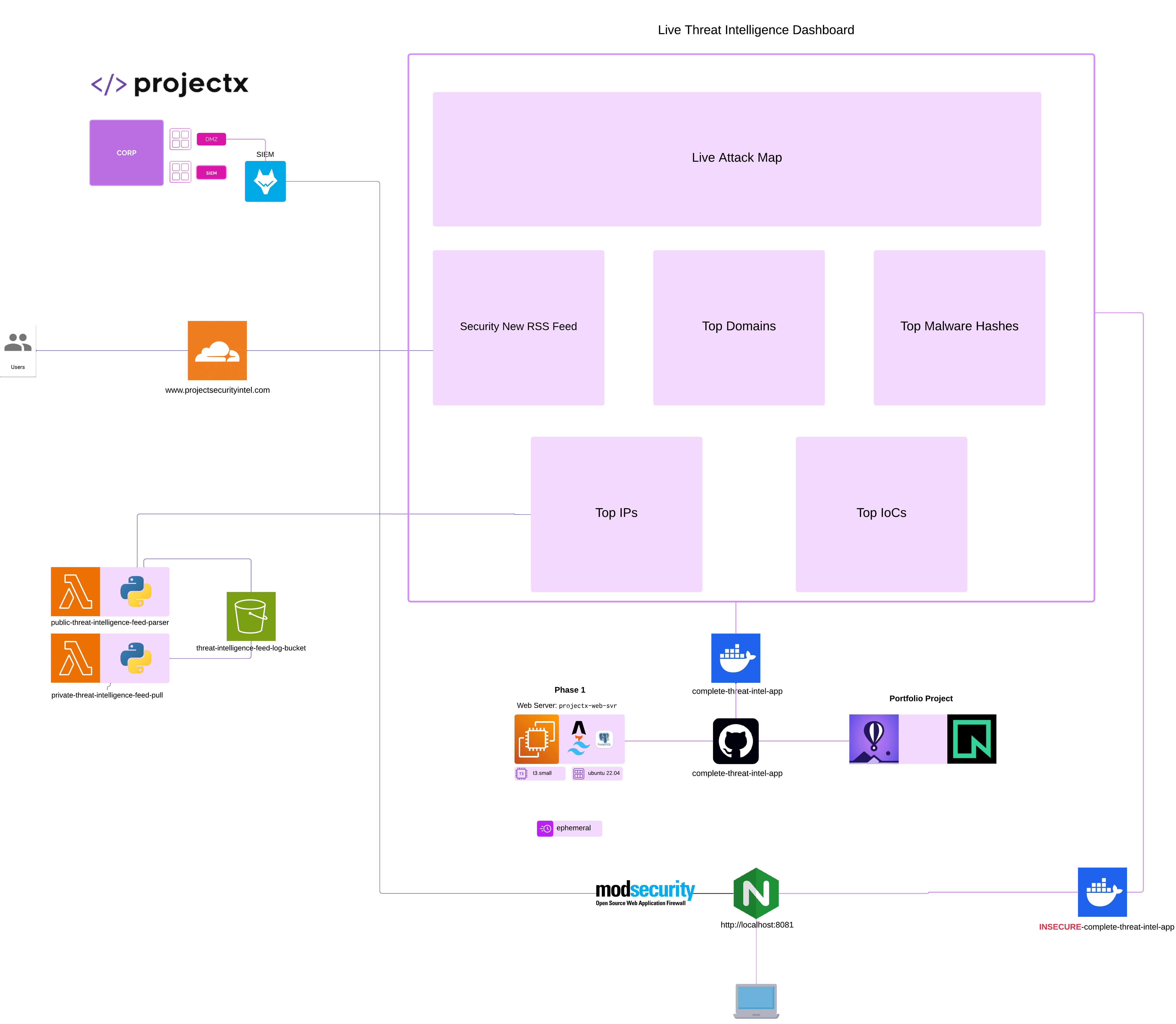
Network topology
What you are adding
The default dashboard shows a title block only. You will add a small top navigation bar with up to four links:
| Link label | Typical destination | Notes |
|---|---|---|
| Dashboard | / |
Stays on the main threat-intel grid |
| Blog | Your Medium or Substack publication URL | Opens in a new tab |
| GitHub | https://github.com/YOUR_USERNAME |
Profile or org page |
| Contact | mailto:you@example.com or a contact URL |
Email or form |
External links should use target="_blank" and rel="noopener noreferrer" so the dashboard stays open and tab behavior stays safe.
Step 1 — Collect your URLs
Gather these before editing code. Replace placeholders in the examples below.
Blog (Medium or Substack)
Use one blog link—the menu label can stay Blog either way.
| Platform | Where to find your URL | Example shape |
|---|---|---|
| Medium | Profile → stories, or publication home | https://medium.com/@yourhandle or https://yourpublication.medium.com |
| Substack | Publication settings → public URL | https://yourname.substack.com |
If you do not have a blog yet, skip the Blog item or link to a placeholder you plan to use later.
GitHub profile
- Sign in to GitHub.
- Open your profile (avatar → Your profile).
- Copy the browser URL, e.g.
https://github.com/janedoe.
Use the profile URL, not a single repository URL, unless you intentionally want the menu to point at one repo.
Contact
Pick one approach:
| Approach | href example |
|---|---|
| Email (simplest) | mailto:you@example.com |
| Contact form | https://forms.gle/... or your site /contact |
| LinkedIn / other | Full https:// URL to the profile |
For portfolio demos, mailto: is enough. You can add a dedicated contact page later (see Step 4 — Optional contact page).
Step 2 — Add the menu to the dashboard header (recommended)
Edit src/pages/index.astro in your dashboard repo (exercise path: exercise-files/web-attacks-101/complete-threat-intel-app/).
Find the existing <header> (title only). Replace it with a flex header that includes <nav>:
<header class="mb-10 flex flex-wrap items-end justify-between gap-4 border-b border-white/[0.06] pb-8">
  <div>
    <p class="text-[11px] font-medium uppercase tracking-[0.2em] text-zinc-500">Threat intelligence</p>
    <h1 class="mt-1 text-2xl font-semibold tracking-tight text-white sm:text-3xl">Dashboard</h1>
  </div>
  <nav class="flex flex-wrap items-center gap-4 text-sm" aria-label="Primary">
    <a class="text-zinc-400 transition-colors hover:text-sky-300" href="/">Dashboard</a>
    <a
      class="text-zinc-400 transition-colors hover:text-sky-300"
      href="https://github.com/YOUR_USERNAME"
      target="_blank"
      rel="noopener noreferrer"
    >
      GitHub
    </a>
    <a
      class="text-zinc-400 transition-colors hover:text-sky-300"
      href="https://YOUR_BLOG_URL"
      target="_blank"
      rel="noopener noreferrer"
    >
      Blog
    </a>
    <a
      class="text-zinc-400 transition-colors hover:text-sky-300"
      href="mailto:you@example.com"
    >
      Contact
    </a>
  </nav>
</header>
Customize:
- Replace
YOUR_USERNAMEwith your GitHub handle. - Replace
https://YOUR_BLOG_URLwith your Medium or Substack home URL. - Replace
you@example.comwith your email, or change Contact to anhttps://contact page.
Reorder or omit links: delete a line you do not need (e.g. remove Blog until you publish). Keep Dashboard first if you add more Astro pages later.
Match your accent colors: if you changed the palette away from sky (see app README), swap hover:text-sky-300 for your accent class (e.g. hover:text-emerald-300).
Step 3 — Verify locally
From the project root:
Open http://localhost:4321 and confirm:
- Dashboard reloads the home grid.
- GitHub and Blog open in a new tab to the correct sites.
- Contact opens your mail client (for
mailto:) or the contact URL.
Fix any broken URLs in index.astro, then commit when satisfied.
Step 4 — Optional contact page
If you prefer Contact to stay on your domain instead of mailto::
- Create
src/pages/contact.astrowith a short message and your email or a link to a form. - Point the nav item to
href="/contact"(notarget="_blank"required). - Reuse the same header/nav markup, or complete Step 5 so you do not duplicate the menu.
Minimal example:
---
import "../styles/global.css";
---
<html lang="en">
  <head>
    <meta charset="utf-8" />
    <meta name="viewport" content="width=device-width" />
    <title>Contact · Threat intelligence</title>
  </head>
  <body class="min-h-screen bg-zinc-950 text-zinc-100 antialiased">
    <main class="mx-auto max-w-2xl px-5 py-10">
      <h1 class="text-2xl font-semibold">Contact</h1>
      <p class="mt-4 text-zinc-400">
        Reach me at
        <a class="text-sky-400 hover:text-sky-300 hover:underline" href="mailto:you@example.com">
          you@example.com
        </a>.
      </p>
      <p class="mt-6">
        <a class="text-sm text-zinc-500 hover:text-sky-300" href="/">← Back to dashboard</a>
      </p>
    </main>
  </body>
</html>
Step 5 — Optional shared layout (multiple pages)
Use this if security-news.astro, contact.astro, or other routes should share the same menu.
5a. Create src/layouts/DashboardLayout.astro
---
import "../styles/global.css";

interface Props {
  title: string;
}

const { title } = Astro.props;

const navLinks = [
  { label: "Dashboard", href: "/", external: false },
  { label: "GitHub", href: "https://github.com/YOUR_USERNAME", external: true },
  { label: "Blog", href: "https://YOUR_BLOG_URL", external: true },
  { label: "Contact", href: "mailto:you@example.com", external: false },
];
---
<html lang="en">
  <head>
    <meta charset="utf-8" />
    <meta name="viewport" content="width=device-width" />
    <title>{title}</title>
  </head>
  <body class="min-h-screen bg-zinc-950 bg-[radial-gradient(ellipse_120%_80%_at_50%_-20%,rgb(39_39_42_/_0.35),transparent)] text-zinc-100 antialiased">
    <main class="mx-auto max-w-7xl px-5 py-10 sm:px-8">
      <header class="mb-10 flex flex-wrap items-end justify-between gap-4 border-b border-white/[0.06] pb-8">
        <div>
          <p class="text-[11px] font-medium uppercase tracking-[0.2em] text-zinc-500">Threat intelligence</p>
          <h1 class="mt-1 text-2xl font-semibold tracking-tight text-white sm:text-3xl">Dashboard</h1>
        </div>
        <nav class="flex flex-wrap items-center gap-4 text-sm" aria-label="Primary">
          {
            navLinks.map((link) => (
              <a
                class="text-zinc-400 transition-colors hover:text-sky-300"
                href={link.href}
                {...(link.external ? { target: "_blank", rel: "noopener noreferrer" } : {})}
              >
                {link.label}
              </a>
            ))
          }
        </nav>
      </header>
      <slot />
    </main>
  </body>
</html>
Centralize URLs in navLinks so you only edit one list when links change.
5b. Wrap index.astro content
At the top of the frontmatter:
Remove the duplicate <html>, <body>, <main>, and <header> from index.astro. Wrap the panel grid:
<DashboardLayout title="Threat intelligence · Dashboard">
  <section class="grid grid-cols-1 gap-5 sm:grid-cols-2 xl:grid-cols-6 xl:gap-6">
    <!-- existing orderedPanels.map(...) -->
  </section>
</DashboardLayout>
Apply the same layout to security-news.astro if you still use that test page.
Step 6 — Deploy the change
If Deploy CI/CD Using Github is configured:
git add src/pages/index.astro
# and src/layouts/DashboardLayout.astro if you used Step 5
git commit -m "Add optional nav menu (blog, GitHub, contact)"
git push origin main
After the workflow finishes, open your EC2 URL (or custom domain once configured) and re-test all links.
Checklist
- [ ] Blog URL points to Medium or Substack (or Blog link removed)
- [ ] GitHub opens your profile
- [ ] Contact uses
mailto:or/contact - [ ] External links use
target="_blank"andrel="noopener noreferrer" - [ ] Menu visible on production after push (if using CI/CD)
Troubleshooting
| Symptom | Likely cause | Fix |
|---|---|---|
| Link goes to GitHub 404 | Wrong username or repo URL | Use https://github.com/<handle> from your profile page |
| Blog opens wrong publication | Copied a single post URL | Use publication/home URL from Medium or Substack settings |
| Contact does nothing | Invalid mailto: or blocked client |
Test mailto:you@domain.com; try a full https:// contact page |
| Menu missing on server | Old build not deployed | git push to main; on EC2: sudo systemctl status threat-intel-dashboard |
Menu only on / |
Nav only in index.astro |
Use shared layout |
Reference
- App customization (colors, panels, menu summary):
complete-threat-intel-app/README.mdin exercise files - CI/CD deploy: Deploy CI/CD Using Github
- Production URL and port 80: Deploy the threat intelligence application