Prerequisites
Network Topology
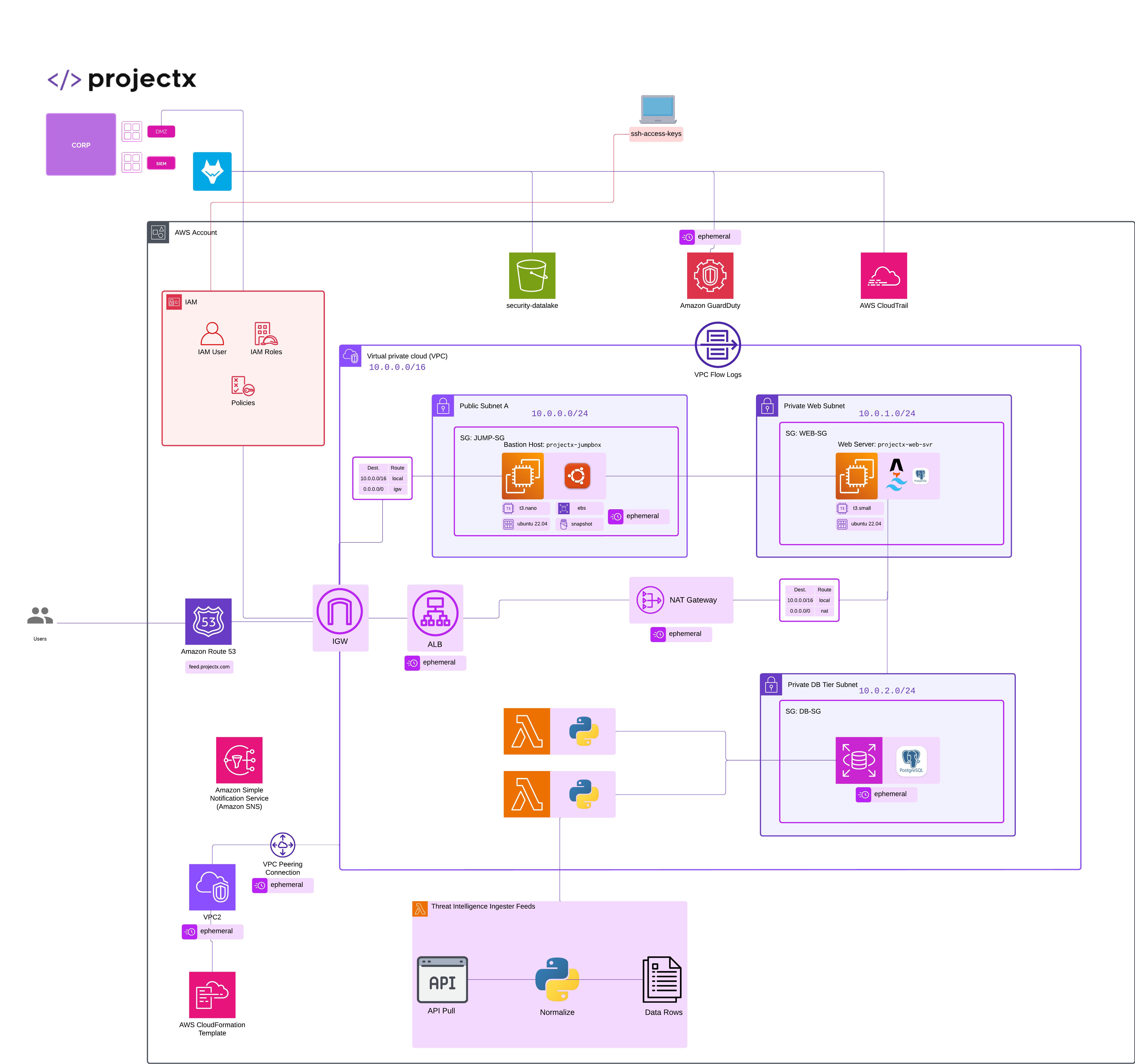
Overview
Create AWS IAM Admin Account
Create an account alias (easier sign-in URL).
IAM → Dashboard → Customize → set alias (e.g., projectsecurity-labs).
Sign-in URL becomes: https://projectsecurity-labs.signin.aws.amazon.com/console
Enable Password + MFA for the root user:
- My Security Credentials (from the account menu) → MFA → Assign MFA device.
Create an Admin group
IAM → User groups → Create group → name: Administrators.
Attach policy: AdministratorAccess.
Create group.
Create the Admin user
IAM → Users → Create user.
Username: projectx-prod-admin.
Access type:
-
Console access → set an autogenerated or custom password (require reset).
-
(Optional) Access key only if you truly need CLI with long-lived credentials. (We will add this later).
Next → Set permissions → Add user to group → choose Administrators.
Create user.
Enforce MFA on the Admin user
IAM → Users → your user → Security credentials → Assign MFA device.
Choose Virtual MFA device → scan QR with Authy/Google Authenticator or create passkey → enter codes → Assign.
Lock down the password policy (account-wide)
IAM → Account settings → Password policy.